

 3.5
3.5








About YouTube
YouTube sits everywhere now, and the mobile app on iOS and Android pulls the full platform into a compact space. It easily enables you to scroll, tap a video, watch them with fine-tuned playback controls, and interact through likes or comments. Signing in through a Google account opens subscriptions, playlists, synced history, and all the usual tools people depend on.
Opening the app sends you straight to the Home tab. It keeps shifting based on watch history, search behavior, and whatever rises in broader trends. A separate Shorts section pushes quick vertical clips; many people drift through these without thinking about it. Subscriptions organizes uploads from followed channels, while the Library keeps older views, playlists, and personal uploads in one place. The player covers the basics—play, pause, skip, scrub—but adds captions, quality shifts down to 144p or up to 4K, and playback-speed options that help when a video drags or moves too quickly.
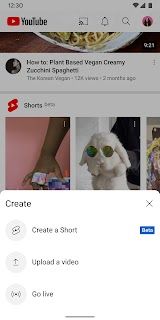
Creators work inside a streamlined upload workflow on mobile. Choosing a clip from the gallery or recording directly feels simple. Titles, descriptions, and thumbnails drop into place, and trimming or light filters handle minor edits. More advanced work remains anchored to desktop tools, since multi-layer editing or precise color adjustments drift out of reach on a phone. Live streaming runs smoothly for quick broadcasts, though anything technical stays easier on a computer.
Premium membership changes the rhythm of viewing. Ads disappear, background play keeps audio running after leaving the app, and offline downloads save videos for poor-signal moments. A particularly innovative addition is the AI-powered “Jump Ahead” feature: when enabled, a button appears after double-tapping to skip ahead; when tapped, it skips to a point in the video that most users tend to jump to. The feature studies crowds of viewing patterns and predicts segments that rarely keep attention. It feels surprisingly accurate, though limited to selected videos.
Testing the app over long sessions shows both polish and rough edges. Navigation through Home, Shorts, Subscriptions, and Library feels quick. The player behaves well, and toggling captions or switching quality happens without friction. Network strain creates the usual buffering spikes when watching HD content through weaker mobile data. Most people expect this, but it still breaks momentum.
Uploads on mobile help for quick vlogs or short live sessions. More demanding edits remain out of reach since mobile tools cover only light trimming and basic adjustments. Live chat interaction during phone-based streaming works, though creators wanting deeper moderation or scene changes hit barriers.
Some reliability issues appear after long use. A recurring irritation involves the mini-player vanishing when shrinking a video out of full screen, even as audio keeps running. A few users mention audio drifting out of sync or frames dropping when rotating the device. Background play locks behind Premium and stops once the screen closes for non-subscribers.
YouTube’s recommendation engine still identifies creators and topics with uncanny accuracy. A recent academic audit found that YouTube’s recommendation system may amplify negative emotions such as anger or grievance, because the algorithm leans toward emotionally charged content to drive engagement. Over time, this may steer some viewers into narrow emotional loops.
Creators continue dealing with automated copyright detection. Claims and takedowns can feel abrupt, and sorting out fair use grows stressful. YouTube offers tools for appeals, strike tracking, and policy explanation, though the process never feels smooth.
Taken together, the app blends a huge content library, sharp recommendation logic, Creator tools, and Premium perks like offline downloads, background play, and AI-driven skipping. Long-term bugs, emotional recommendation concerns, and copyright tension remain real issues. Most viewers still find the advantages larger than the drawbacks, though creators and those sensitive to algorithmic influence may proceed more carefully.


Features of YouTube
Personalized feed that shifts based on individual watch patterns and interactions.
Shorts hub offering quick vertical clips suited for brief viewing sessions.
Full player with captions, manual quality choices, and adjustable playback speed.
Mobile upload tools that handle trimming, metadata entry, and publishing.
Live streaming from a phone with immediate audience chat.
AI-guided “Jump Ahead” control that moves to commonly replayed moments.
Picture-in-Picture dot on TV timelines for quick navigation.
Offline downloads for Premium members needing access without a connection.
Background audio play for Premium users multitasking across apps.
Google account syncing that keeps history, playlists, and subscriptions aligned across devices.

Pros
Enormous global library covering education, entertainment, tutorials, and news.
Smart recommendations help viewers uncover new creators and topics.
Mobile upload tools let creators post from almost anywhere.
Live streaming builds direct interaction with audiences through a phone.
Background audio keeps content going during multitasking or screen lock.
Offline downloads assist in low-signal areas or complete disconnection.
AI “Jump Ahead” trims wasted time by skipping low-engagement moments.
Picture-in-Picture expands multitasking on TV or mobile.
Quality controls adapt playback to bandwidth limits.
Google account syncing maintains continuity across devices.
Experimental features give early access to AI and playback updates.
Copyright and creator support offers tools for navigating strikes and appeals.
Recommendation patterns sometimes push emotionally charged loops.

Cons
Mini-player occasionally disappears when transitioning from full screen.
Non-premium users lose playback once switching apps or locking the screen.
HD streams consume heavy bandwidth and buffer on weaker mobile networks.
Editing tools remain limited next to desktop-level software.
Mobile live streaming lacks advanced overlays or scene controls.
“Jump Ahead” appears only on selected Premium-eligible videos.
Jump-ahead UI may linger or misfire, interrupting navigation.
Premium Lite users may not receive Jump-Ahead access.
Copyright flags and strikes add pressure for creators.
Some app versions produce frame drops or audio mismatch issues.
Ratings
This number is based on download statistics from Google Play and may include historical
data.